v0.4.0: An iPhone companion
Clerk.AI is a Mac app that does your company's monthly bookkeeping prep. It collects the statements, hunts down the receipts that go with them, and hands your accountant a folder and a drafted email. It asks you the few things only you can answer, and as of this release it can ask you on your phone.
Answering from your phone
In the one close I have minute-by-minute logs for, the longest single stretch was fifty minutes of the app sitting there waiting for me to come back and say one sentence. That is the shape of this work. It runs for a while on its own, then it needs one thing from you, then it runs again, and being tied to the desk for the one sentence was the wrong trade.
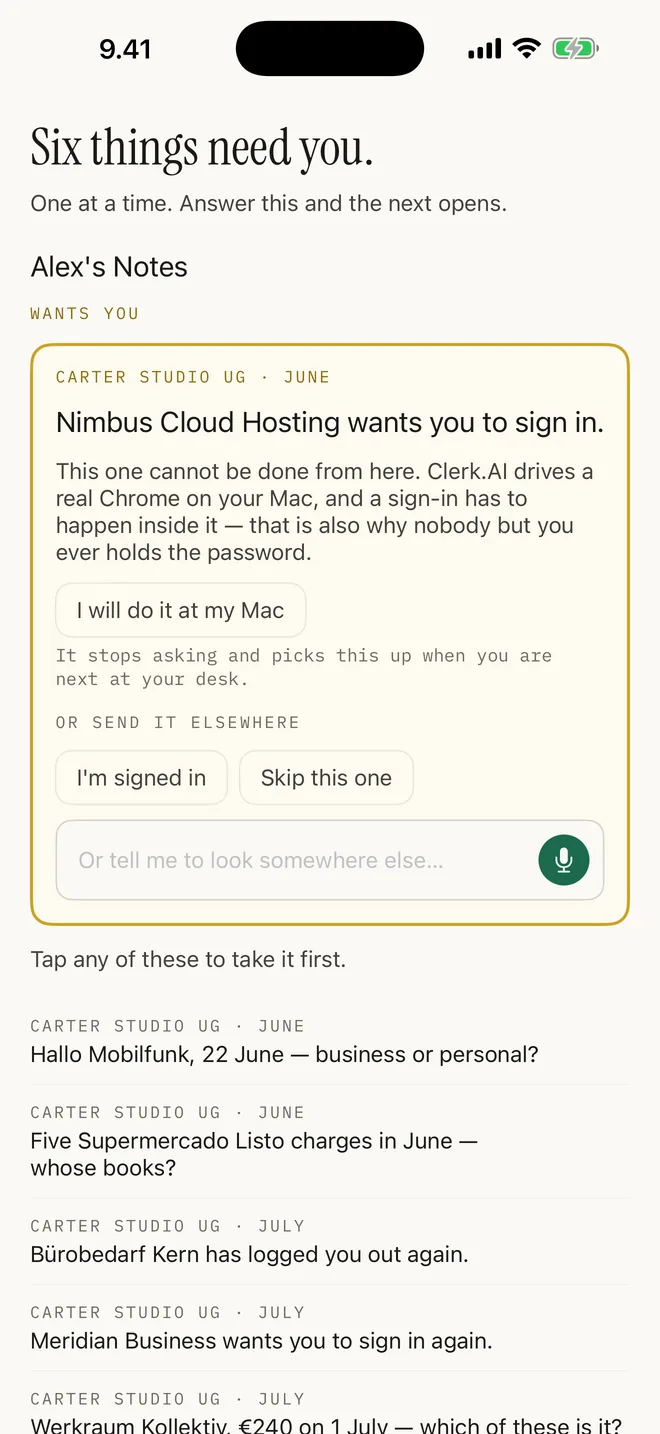
So there is an iPhone app. It opens on what the close is doing and when it last moved, which is the thing you want to know when you pick up your phone: whether it is working, waiting on you, or stuck. When there is a question, you hold the button, say the answer out loud, and put the phone back in your pocket. The recording goes over to your Mac and is transcribed there on your own hardware, and the close carries on from where it stopped.
It is early access for now. The app is not in the App Store yet, it is going in as soon as we can get it through review, and until then it goes out over TestFlight, so ask and we will send you an invitation. Nothing on the Mac depends on it.
Update, 25 August 2026 — it is in the App Store: Clerk.AI for iPhone, free, no TestFlight invitation needed. The paragraph above stands as it was written. Two things held it up, and both are worth knowing: Apple rejected the first submission over the word "Mac" in the subtitle and wanted a film of the app running beside the hardware it talks to — and then, once approved, it sat on sale in zero countries for four hours, because approving an app does not publish it and the territories are a separate switch nobody had thrown.
Logins are the exception, because they genuinely need you at the machine. When a close hits one, the phone says so, tells you nothing else is blocked, and offers you whatever other questions it can get out of the way while you are up.
Sync runs through your own iCloud, between your Mac and your phone, and the companion is free for everybody. It is not one of the rungs on the pricing page, and there is nothing to buy to answer questions on your phone.
What it is doing while you are not watching
Clerk.AI opens a browser and works through the period: signing in where it can, downloading the statements, then going after the proof behind each line. Invoices in your mail, receipts in the billing portals you use, the photo you took of a receipt in a shop, which it reads with the OCR built into macOS.
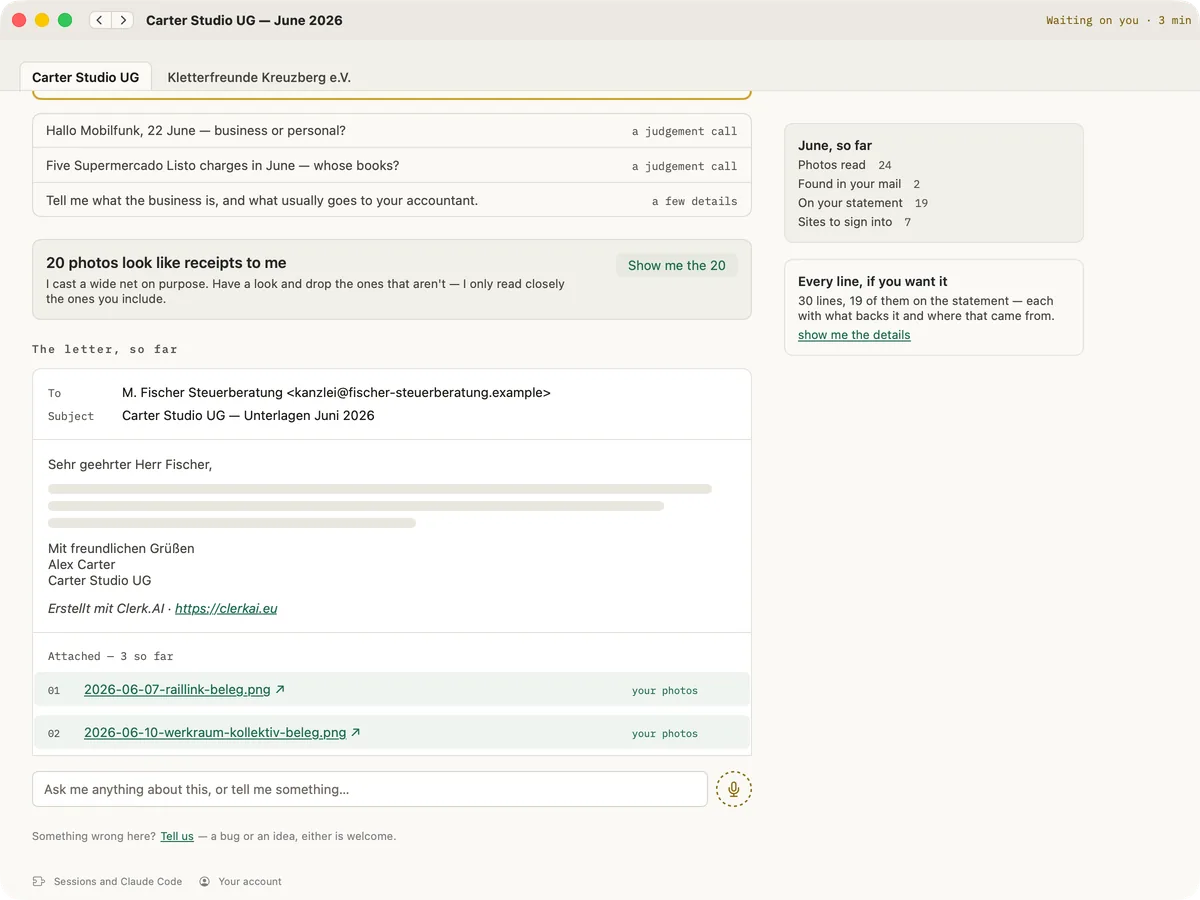
What you watch while that happens is the email your accountant is going to get. It is on screen from the first minute, mostly grey, and each line goes solid as the thing behind it turns up. You do not have to learn what the app is doing. You can see how much of the letter is real yet.
It works in runs of about an hour, in the background, and you are not meant to sit and watch it. A month usually takes a few of those, and how long the whole thing takes on the calendar is mostly down to how quickly you answer it, because when it needs you it stops and waits.
It needs you a handful of times per close, and most of those are the same request: get me past a login. It gets itself into most places on its own and can even fish a one-time code out of your inbox, but anything that wants to prove you are you, an app to tap or a code to scan or a passkey, is you, on your machine, and it should stay that way. That is not only banks. Brokers, exchanges and any supplier portal sitting behind bank identification hit the same wall. The rest are the judgement calls it cannot make, like whether a particular lunch was a client expense.
Photos, where it deliberately over-collects
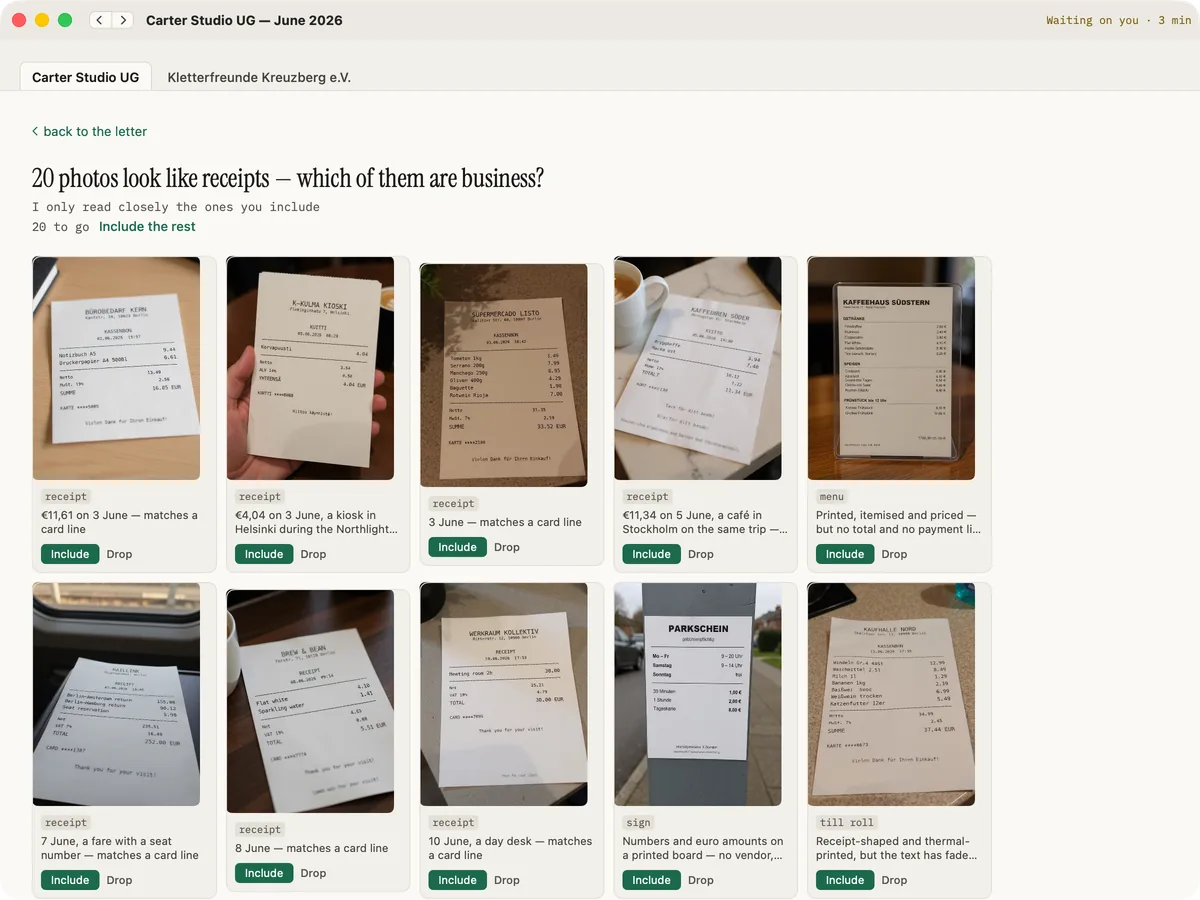
Anything on your phone that looks like a receipt gets offered to you as a grid, each one with what it managed to read off it. You include or drop them one at a time, or take the rest in a single press. Dropping is remembered, so the same photo of somebody's dog is never put in front of you twice.
The handover, and what happens after it
At the end you get a flat folder named the way your accountant likes, and the email in whatever language they read, with every attachment in order. You look it over and you send it. The app will not mark your books closed for you and it will not send anything on your behalf.
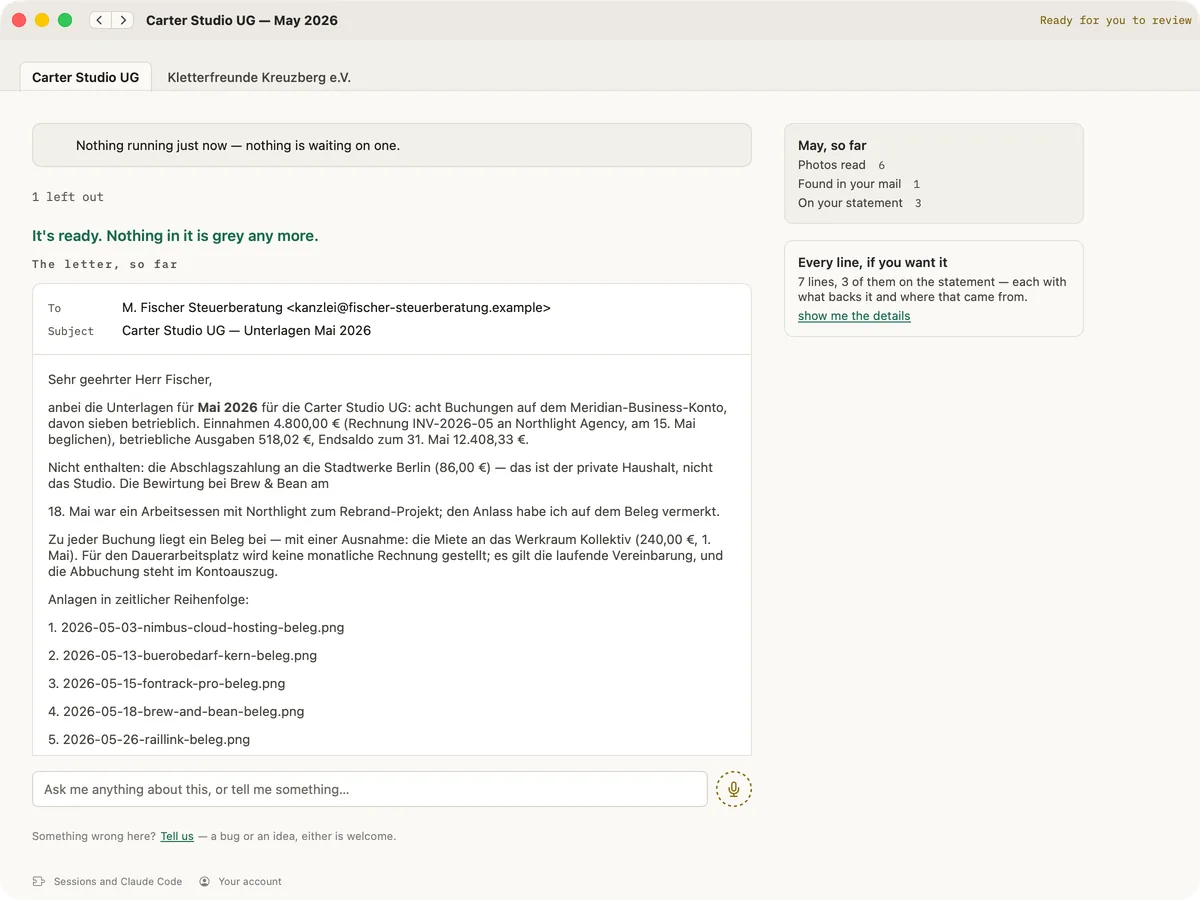
A period that has been sent stays open to what happens next, which is the part of the handover that used to fall on the floor. Your accountant writes back asking for the one thing that was missing, you paste that in, and it goes and fetches it and remembers for next time, so the same gap does not come round again in a month.
Setting it up
The close itself works. I have been closing my own books this way for nine months, the last two with the app and the seven before that driving Claude Code by hand, one prompt at a time, before the app existed. Setting it up is the part that still costs you something real, and what 0.4.0 changed about it is the order rather than the contents.
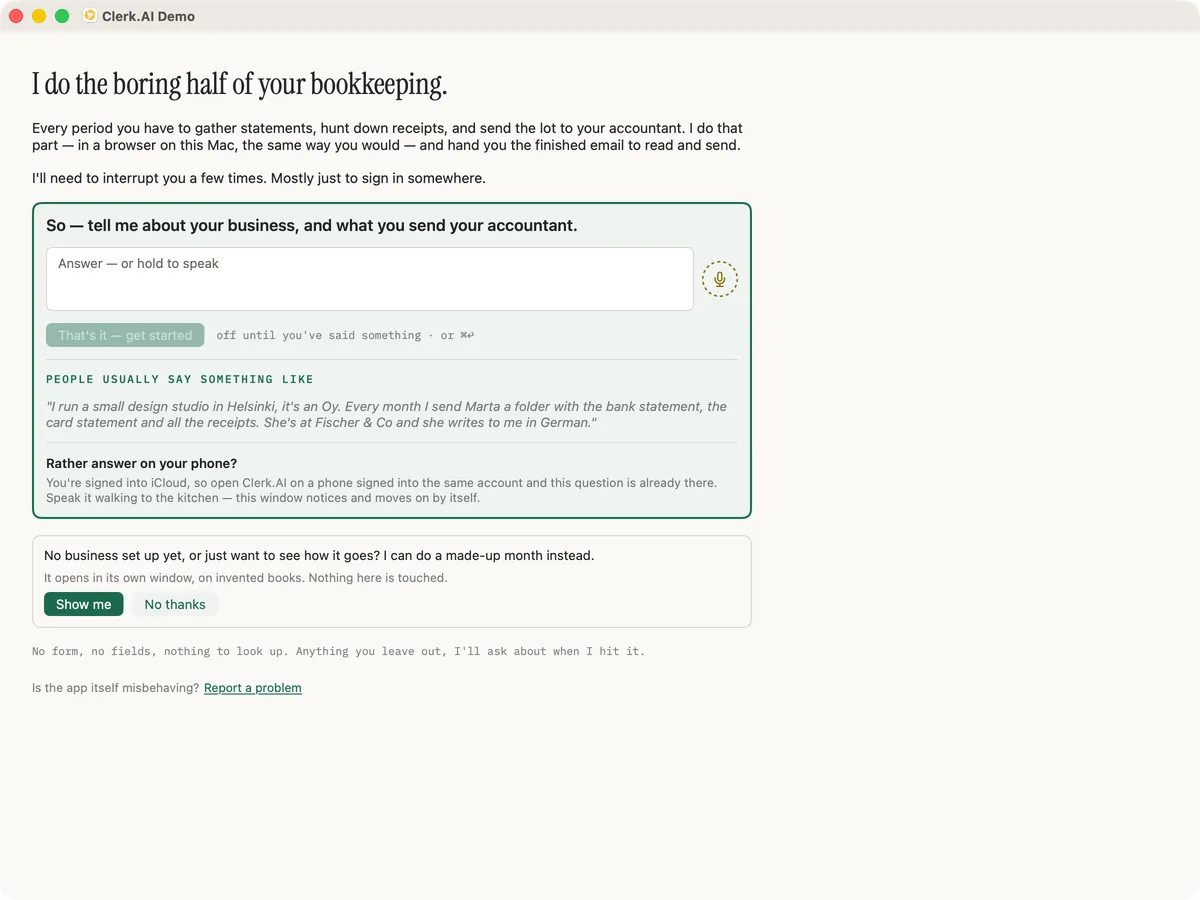
It is three screens. The first is the question above, and nothing is asked of you before you have answered it: no terminal, no permissions, no account. Typing needs no permission at all, so if you type you are never interrupted by a system dialog before you have said a word, and the microphone is asked for the first time your hand reaches for the mic.
The second screen is the technical part, and it arrives only because you pressed go. It wants one line pasted into Terminal, which installs the engine, and it wants to know who is paying for the AI. Your answer stays quoted at the top of it the whole time. There is no Continue button: it is deliberately dead and says what it is still waiting for, and when the last check goes green the screen becomes the read-back on its own. That terminal line is where people get stuck, and I would rather say so here than let you meet it the night before a deadline.
Before anything acts on your behalf it asks you to accept what you are letting it do, and the other button on that card quits the app. Then the third screen reads back what it understood, you fix anything it misheard, and that is where you pick the month. It is the only place a period is ever chosen: after this, when one ends, it starts the next itself.
What you need
A Mac, an accountant you already send things to, and your own Anthropic subscription, because the app drives Claude Code and you bring your own account for that. We do not resell AI usage.
It drives a separate Chrome profile that you sign into yourself, so your everyday tabs and logins are not part of it. That is also why it works with banks and portals nobody has built an integration for: it is a real browser doing what you would do.
Try it on a company that doesn't exist
The reasonable thing to be nervous about is letting software drive a browser that is logged into your bank. I would be. So when your first close starts, it offers you a made-up month to watch while you wait. That opens in its own window on a made-up company with made-up receipts, keeps its own storage, and never touches your real books. Turning it down costs nothing and it does not ask again.
One thing to know: its questions reach your phone alongside real ones, because every open vault syncs through your own iCloud, so a demo month will put fictional questions in your inbox. Watching it do a month for somebody fictional answers the nervous question better than anything I can write on this page.